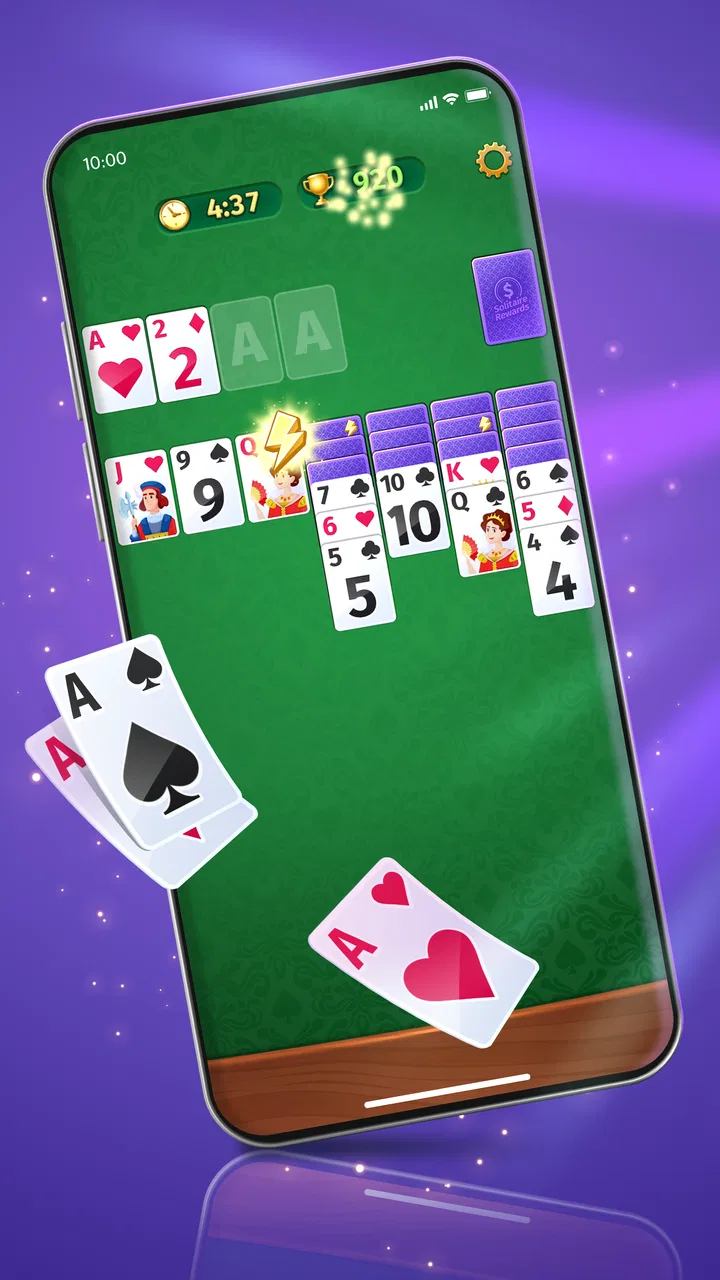
Solitaire Rewards
- 4.8
- Rating
- 100.00K
- Installs
- Free
- Price

 Analysis by App-foxy
I spent time with Solitaire Rewards as a simple card game for short breaks, and its main appeal is easy to understand: it gives you a familiar solitaire-style activity without asking you to learn a complicated system first. Developed by Apperfun, it sits in the card-game category and is free to play, which makes it an easy download for anyone who wants something casual rather than a large, story-driven game.
What interested me most was not just whether the cards were enjoyable, but how comfortably the game works in different everyday situations. Solitaire is often played one-handed on a phone, in brief sessions, or by people who prefer a quiet activity with predictable rules. That makes readability, navigation, touch accuracy, and visual comfort especially important. My overall impression is positive, although the experience is best suited to players who already enjoy traditional solitaire and do not need a highly customized accessibility setup.
How the game feels to read and navigate
The basic idea is immediately approachable. The store summary is simply “Play Solitaire,” and that straightforward identity matches the way I approached it: I could open the game and focus on arranging cards instead of spending time learning a complex menu structure. For a familiar card game, this is a strength. New players can understand the objective through the cards themselves, while experienced solitaire players can get into a round without much explanation.
You May Also Like

 Blood Strike: 2.5 Anniversary
Blood Strike’s Loadouts Turn Every Drop Into a Tactical Gamble
A close look at Blood Strike’s custom loadouts: how fast access to signature weapons reshapes its battle royale rhythm, rewards preparation, and narrows the gap between fights.

 Pandora - Music & Podcasts
Pandora’s Music Is Easy to Start, but Harder to Recover
Pandora’s strength is its low-effort path from a seed to a station. Its weak spot is how much confidence it asks you to place in connection, setup, and quiet recovery.

 8 Ball Pool
 Is Built on Rivalries, Rematches, and Routine
A close look at the rivalries, rematches, shared routines, and unanswered safety questions that turn a quick pool match into a persistent mobile community.

 Samsung Music
’s Quiet Strength Is Playing What You Already Own
Its reach comes less from spectacle than from dependable access to a personal library. That simplicity is both the app’s strongest retention engine and its ceiling.

 AccuWeather: Weather Radar
AccuWeather Review: A Quick, Clear Forecast for Everyday Decisions
For everyday plans, the best forecast is the one you can understand quickly. AccuWeather makes rain timing, radar, and local conditions easy to act on, with a few trade-offs.

 Hill Climb Racing
Why Hill Climb Racing Still Turns Crashes Into One More Run
A tiny car, a bumpy hill and one more upgrade: Hill Climb Racing keeps resurfacing because its simple chaos makes every near-miss feel personal.
More From Our News Desk
View All News


I found that the clearest way to use a game like this is to treat each round as a small visual puzzle. I scan the tableau first, look for exposed cards, and then decide whether a move opens a useful column or merely shifts cards around. That habit is more valuable than tapping quickly. It also makes the game easier to follow for players who prefer deliberate decisions over fast reactions.
Navigation matters more than it might seem in a card game. When a screen is busy, a player can lose track of which pile is active, which card has just moved, or whether a tap registered. Solitaire Rewards works best when I slow down and use a consistent visual routine: check the available cards, identify the destination, and then confirm the result before making the next move. This is a practical approach for anyone who finds rapid visual changes tiring.
The card format itself offers a useful advantage over many mobile games. There is no need to remember a long sequence of buttons, character abilities, or map locations. The interaction is built around a small number of familiar objects. That makes it a reasonable choice for someone who wants a low-learning-curve game, including a relative who is comfortable with cards but less interested in modern game interfaces.
At the same time, solitaire is not automatically easy for every reader. A card game still depends on distinguishing suits, ranks, colors, and positions across several piles. If those elements are difficult to see on a phone, the familiar rules do not remove the underlying visual demand. I would recommend trying it on the device you actually plan to use rather than assuming that a simple game will be comfortable for everyone.
The current version is 01.14.28, and the game is available for Android devices running version 7.0 or later. That broad operating-system requirement makes it relevant to people using older Android phones, although the comfort of the experience will still depend on the particular screen, touch response, and general condition of the device.
Reading cards without rushing
My most useful tip is to avoid judging the game by the speed of the first few taps. Solitaire rewards careful scanning. Before moving anything, I look at the full layout and identify cards that can reveal hidden options. This reduces unnecessary movement and helps when the screen feels crowded or when I am playing in less-than-ideal lighting.
For players with reading or attention difficulties, a repeatable routine can make the round less demanding. I check the tableau from left to right, note the exposed cards, and then inspect the available pile. Keeping the same order prevents me from repeatedly searching the entire screen. It is a small workflow, but it turns a loose visual task into a series of manageable checks.
Another practical point is session length. Solitaire Rewards is easier to use in a short, focused break than during a long session when attention starts to fade. If I notice myself making moves without checking their consequences, I stop and return later. That is not a flaw unique to this game; it is simply the point where a calm card puzzle can become visually repetitive.
Touch, movement, and sensory comfort
Card games are usually less demanding than action games because they do not depend on rapid reflexes, complex gestures, or precise timing. That is an important benefit here. I can think through a move before touching the screen, which makes the game more suitable for players who prefer a slower pace or who find fast interactions uncomfortable.
Still, tapping the correct card and destination requires a degree of motor precision. Small screens can make adjacent cards feel close together, particularly when the device is held in one hand. My advice is to use two hands when possible: one to stabilize the phone and one to make deliberate taps. This is more reliable than trying to play while walking, carrying something, or balancing the phone awkwardly.
A useful everyday scenario is waiting in a clinic or sitting on public transport. In those settings, I can play a few moves without needing sound or a continuous connection to a social group. The game suits moments when I want mental activity but not the pressure of a competitive multiplayer match. However, I would avoid it while walking or crossing a street because even a slow card game can draw attention away from the surroundings.
For users with tremors, reduced dexterity, or inconsistent touch control, the main question is whether the game accepts their natural tapping style comfortably. I would not describe it as a specialized assistive game, and I would not expect it to remove the need for accurate card selection. A larger phone or tablet may be a better fit than a compact handset because the extra space gives each pile more breathing room.
Players with limited hand mobility may also prefer placing the device on a stable surface rather than holding it. That simple change can reduce accidental movement and make longer rounds less tiring. It also creates a more consistent viewing angle, which helps when glare or changing light makes the cards harder to inspect.
Sound is another situational consideration. I often prefer a card game that can be played quietly, especially in a waiting room or shared home. Solitaire Rewards works naturally as a low-distraction activity because the core task is visual and turn-based. If you rely on audio cues to understand what is happening, however, I would test the game personally before committing to it, since a visual card layout may remain the primary way to follow a round.
Using it in different environments
On a bright day, reflections can make card details less comfortable to read, while a dark room can make a bright phone screen feel harsh. I get better results by adjusting the phone’s brightness to the surroundings and avoiding direct glare. This is a general phone habit, but it matters more in solitaire because the entire challenge depends on reading several small areas at once.
For older players, the strongest use case is a familiar, unhurried pastime. Someone who already knows solitaire can concentrate on choices rather than rules. I would introduce it by showing the basic card movement and then letting the player discover a comfortable pace. The game is less suitable if the person needs very large controls, spoken guidance, or extensive visual customization.
For younger players, the Everyone content rating makes the game broadly appropriate from an age-classification perspective. That does not mean every child will find it engaging. A child who wants constant action may lose interest quickly, while one who enjoys puzzles and cards may appreciate the quiet structure. I see it as a better fit for calm play than for energetic entertainment.
It can also work for people who want a mental reset between tasks. I sometimes prefer a short round to scrolling through social media because the objective is clear: examine the layout, make a choice, and see whether the position improves. That kind of limited focus can feel refreshing, although players who are trying to reduce all screen time should remember that it is still a phone activity.
Rewards, repetition, and the limits of the format
The short description presents the game as “Solitaire Rewards,” so the reward-oriented framing is part of its identity. For me, that makes each round feel more goal-directed than playing with a physical deck alone. The important trade-off is that reward motivation can either add purpose or make a simple pastime feel repetitive, depending on what you want from solitaire.
If you enjoy tracking progress and having a reason to complete another round, this approach may keep the game interesting longer. If you prefer a completely uncluttered card experience, you may find the reward emphasis less appealing than a traditional offline solitaire app with fewer surrounding incentives. I would choose this game for light motivation, not for a pure simulation of playing cards at a table.
That distinction also helps explain who should skip it. Players looking for deep strategy, a large collection of card variants, or a rich competitive community should consider a more specialized card platform. Solitaire Rewards is aimed at the familiar solitaire loop. Its value comes from convenience and casual repetition, not from transforming the genre into something dramatically more complex.
The free price lowers the barrier to trying it. The game has reached more than fifty thousand installs and holds a 4.8 average from around one thousand ratings, with over two hundred written reviews. Those figures suggest that the basic concept has found an audience, but they should not replace personal testing. Ratings rarely reveal whether the interface suits your eyesight, touch accuracy, or preferred pace.
I also think the developer name is worth noting for readers who like to identify the publisher before installing: the game comes from Apperfun. That is useful when searching for the correct title among similarly named solitaire products. I would still check the app’s identity carefully before downloading, especially because card games often have near-identical names.
What I would compare before choosing it
Compared with a physical deck, the game is more convenient and easier to carry, but it cannot provide the same tactile feedback. A physical deck may be better for someone who enjoys handling cards, wants a break from screens, or needs larger objects that are easier to grasp. The phone version wins when space, portability, and quick setup matter more.
Compared with a basic solitaire app designed mainly for offline play, Solitaire Rewards has a more goal-focused presentation. That can be motivating, but a minimalist alternative may feel calmer for players who dislike progress pressure. The better choice depends on whether you want a reason to continue or simply want to arrange cards without extra emphasis.
Compared with fast-paced mobile games, this is far gentler on reaction time and attention switching. There is no need to follow a moving target or memorize a complicated control scheme. However, it is still visually concentrated, so someone with difficulty distinguishing card details may actually find a spoken game, an audio puzzle, or a larger-format tabletop activity more accessible.
Remaining barriers I would consider before installing
The biggest practical barrier is visual density. Even when the rules are familiar, several piles compete for attention. Players with low vision, color-vision differences, or difficulty distinguishing symbols should pay close attention to whether the card faces are comfortable on their own device. I would not assume that a positive general rating means the layout will work equally well for every visual need.
Touch accuracy is the second barrier. A player may understand the correct move but still struggle to select the intended pile. Using a larger screen, stabilizing the device, and tapping slowly can help, but those are workarounds rather than a substitute for dedicated accessibility controls. If precise tapping is consistently frustrating, another card format may be kinder.
There is also a concentration barrier that is easy to overlook. Solitaire looks relaxing, but a poor layout or a difficult position can require sustained visual searching. People with fatigue, migraines, attention limitations, or sensitivity to screen brightness may prefer very short sessions. I would treat the game as an optional break, not as a task that must be completed.
Situational access matters too. A phone can be convenient in a waiting area, but noisy movement, glare, one-handed use, or interruptions can make a round less comfortable. I get the best experience when seated, with the phone supported, and with enough time to inspect the layout. That makes the game less suitable for moments when I need to react to my surroundings continuously.
Finally, the reward framing may not suit every player. Some people enjoy small goals, while others feel that rewards turn a relaxing pastime into a reason to keep playing. If you are trying to limit phone use, set your own stopping point before beginning a round. That simple boundary keeps the game serving your break instead of quietly extending it.
My inclusive verdict
I recommend Solitaire Rewards to people who want a familiar card game, free access, and a calm pace that fits short sessions. It is especially appealing if you already understand solitaire and want something you can pick up without learning a large ruleset. The Everyone rating and support for Android 7.0 or later also make it approachable for a broad range of users and devices.
From an inclusion perspective, its strongest quality is the low-pressure structure. I can think before acting, play without depending on sound, and stop after a few moves. Those traits make it more adaptable than action-heavy games in everyday situations. A careful routine, stable phone position, and sensible screen brightness can improve the experience considerably.
My recommendation is more cautious for anyone who needs large cards, spoken feedback, extensive contrast choices, or unusually forgiving touch controls. I would test it on the intended device first. If the card faces are easy to distinguish and the taps feel reliable, it can be a pleasant companion for waiting rooms, quiet evenings, or brief mental breaks. If not, a physical deck, a tablet-sized card game, or a purpose-built accessible alternative may be the better choice.
After using it, I see the game as a focused casual option rather than a complete solution for every solitaire fan. Its best feature is the simple, deliberate card routine, while its main limitation is that comfort depends heavily on the player’s screen, vision, touch control, and tolerance for reward-driven repetition. For the right player, that balance is easy to accept, and the free download makes trying it a low-risk decision.
FAQs for Solitaire Rewards
01What is Solitaire Rewards and how does it work?
Solitaire Rewards is a mobile app that combines the classic solitaire card game with a rewards system. Players can enjoy traditional solitaire gameplay while earning points that can be redeemed for real-world rewards. The app provides a fun and engaging way to play solitaire with the added benefit of earning incentives along the way.
02Is Solitaire Rewards free to download and play?
Yes, Solitaire Rewards is free to download and play on both Android and iOS devices. While the app offers in-app purchases for additional features or bonuses, players can enjoy the core solitaire experience and earn rewards without spending any money.
03What types of rewards can I earn in Solitaire Rewards?
In Solitaire Rewards, players can earn points by completing games and achieving high scores. These points can be redeemed for various rewards, such as gift cards, discounts, or other promotional offers from participating partners. The specific rewards available may vary based on location and availability.
04Does Solitaire Rewards require an internet connection to play?
While you can play the solitaire game offline, an internet connection is required to access the rewards system, update scores, and redeem points. Staying connected ensures you can fully enjoy all the app's features and keep your progress synced across devices.
05Are there any ads in Solitaire Rewards, and can they be removed?
Solitaire Rewards does include ads, as they support the free version of the app. However, users who prefer an ad-free experience can opt for in-app purchases to remove ads. This option allows players to enjoy uninterrupted gameplay while still earning rewards.
Pros
- Engaging daily challenges.
- User-friendly interface.
- Attractive rewards system.
- Customizable card designs.
- Offline play available.
Cons
- Ads can be intrusive.
- Limited free features.
- Occasional app crashes.
- In-app purchases required.
- Slow customer support.

Solitaire Rewards
Gallery